People at marketing are genius or the average buyer is stupid.
So instead of selling a 3ghz processor that can run at 2ghz to save power they sell a 2ghz processor that can operate in turbo mode at 3ghz and everybody drops their jaws.
Tell me is just me.
miércoles, 23 de septiembre de 2009

viernes, 3 de julio de 2009
Slackware 13 rc1 review (32 and 64 bits)
It's been a long time since my last slackware review, this time I've been tempted to do a review of the rc1 of slackware 13 because of x86_64 support, I'll try to do a comparative between booth versions.
Booth versions will be installed as virtual machines on vmware server over kubuntu 8.04 64 bits (I had some freeze troubles with booth versions of slackware and I don't know if they are related to the fact that they were running on vmware).
Machine specs
Default desktop
The default desktop is KDE version 4, kudos to kde team.
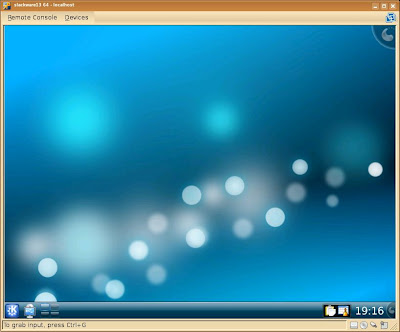
Curiosities:
Booth versions will be installed as virtual machines on vmware server over kubuntu 8.04 64 bits (I had some freeze troubles with booth versions of slackware and I don't know if they are related to the fact that they were running on vmware).
Machine specs
- Intel Q6600 quad core processor overclocked at 3.0 Ghz
- 4 Gb of RAM
- intel dg35ec motherboard
- Kubuntu 8.04 64 bits
- VMware-server-2.0.0-116503.x86_64
- WD 250Gb SATA hard disk
- 1gb of ram
- 2 processors asigned
- 8 Gb hard disk pre allocated optimized for performance (not security)
- slackware-current-30_Jun_2009-DVD.iso (1,747MB) ftp://ftp.slackware.no/linux/slackware/slackware-current-iso/slackware-current-30_Jun_2009-DVD.iso
- slackware64-current-30_Jun_2009-DVD.iso (1,682MB) ftp://ftp.slackware.no/linux/slackware/slackware-current-iso/slackware64-current-30_Jun_2009-DVD.iso
- Wellcome screen: press enter
- select your keyboard: press 1 to select keyboard, hit enter to use the US keyboard (I selected the spanish layout)
- login as root: write root and press enter
- partition your hard disk: write cfdisk at the console, hit enter and make the partitions on your harddisk, for this test the hard disk will be partitioned 8250 mb single partition for / filesystem and a 337 mb for a swap partition
- begin the installation process: write setup on the console to run the good old slackware installer
- select the swap space option: the swap partition you have created should appear, press ok, the installer it's going to ask you to check for bad blocks, I choosed no, the installer it's going to show you a resume screen, press enter
- select linux partitions, in my case there is only a root partition, press enter, the installer it's going to ask you for the format mode, I selected quick format
- Select filesystem for your hardisk..... mmmm...... let's try ext4 :), the installer shows you a resume screen
- select the slackware 13 installation source, in my case a slackware cd or dvd, option 1 and press enter, select auto for the scan of the medium
- In my case I would make a full install of slackware, I select everything and press enter, in the prompt mode for packages installation I selected full
- and... and... ... it's freezed (for x86_64) version, try again with reiser fs and freeze, again with huge.s kernel and ext2 and it worked...
test for 32 bits version will be with the huge.s kernel and the ext2 filesystem... and... and... it's freezed, well, let's try with ext4... freezed... reiserfs... freezed, hugesmp.s and ext4... and it worked...
- make usb flash boot, selected skip
- install lilo, selected simple
- frame buffer, selected 800x600, 256 colors
- extra kernel parameters: pressed enter
- selected no for utf-8 console
- lilo destination: mbr
- mouse configuration: imps2
- gpm configuration, selected yes
- configure your network: yes; hostname: slack; domainname com; ip address setup, selected dhcp; dhcp hostname: pressed enter; confirm setup: yes
- startup services: press enter and select the defaults (netatalk, fuse, hald, innetd, messagebus, pcmcia, syslog, sshd)
- try custom fonts: no
- hardware clock set to utc, no, selected my country
- desktop manager: kde
- select password for root: no (you should do it, and don't forget it)
- selected exit to reboot
- write reboot on the console and press enter

- installation time (only packages from the moment it install the first A section package to the make usb flash boot screen): 64 -> 20.5 min; 32 -> 27.55 min
- first boot time (from lilo to login): 64 -> 38 secs; 32 -> 43 secs
- second boot time (the first time it do some process that it only does the first time): 64 -> 30 secs; 32 -> 33 secs
- first startx time (from enter to akonadi report): 64 -> 30 secs; 32 -> 64 secs
- startx after logout from first startx (from enter to akonadi report): 64 -> 20 secs; 32 -> 20 secs
Default desktop
The default desktop is KDE version 4, kudos to kde team.

Curiosities:
- new bootup image


- The welcome screen of the installer iso for the 64 bits version of slackware says version 12.34567890 instead of 13 rc1 (although I found the numbers of 1 to 0 a nice detail :P), also it says that the machine has to be at least pentium pro :P
domingo, 23 de noviembre de 2008
Interesting phrases
- Reality hack
-seen somewhere - "It is coderspeak. It is the language of our thoughts."
-http://poignantguide.net/ruby/chapter-3.html - Y si solo eres cuidadoso y cariñoso y dejamos que el universo sea un caos?
-una amiga - To kiss is the most basic form of sex
-Me
miércoles, 3 de septiembre de 2008
Google's Chrome
Well, it has been a lot of talk about google's chrome, about the new UI and about the approach to build a web browser.
But people hasn't pay enough attention to another piece of chrome that's also really interesting, I'm talking about the comic presentation.
This "comic" is also impresive, at least for the IT people, for the ones of you who hasn't RTFC it's time to do it and agree or disagree with me.
From my point of view it's a remarkable example about how to explain:
- Design of an application focused on threads
- Issolation (inherited from the treads) that make the browser more reliable and secure
- Security achived through the use of sandboxes (for plugins, each page, and javascript), even explains some approaches to deal with phising
- Javascript: one of the cornerstones of the new browser, if we can call it that way, betweeen others we can find that the code is compiled rather than interpreted, making chrome the ferrari of the javascript
- User interface: even if the address bar has been taked only 1 inch down it means that it belong to the tab rather than the tab to the browser and the bar to the browser, minimalistic, where are the file, edit menus? do you miss them?? I don't!
- memory administration (direct benefit of the new architecture of the browser)
- Garbage collection, and approaches to implement it
- psychology: people wan't to see thing's that they don't want other to know they saw, I'm talking about: incognito window
- what an application should be: "if you can ignore the browser we have made a good job"
- security levels and how read|write permissions should be granted
what I think:
- want to write something for all the browsers but not every browser support the same features, use gears (of course, if chrome become the new defacto browser, or everybody adopt the new standard)
- more faster javascript: why? before we have two approaches, desktop or web, if the web browser become more faster to handle the javascript aka the new language for client side business logic where's the division?, instead of doing desktop applications, let's blur the division between these ones and stay were we are kings (talking bout google) web.
- let's call it a os so we can throw it to microsoft (don't know who started this but it's a stupid) and make publicity
- it's open source, it's faster, it's better (IMHO of course), but the first one limit the adoption of the foreones, so we are making bigger the difference between the open source project's who addopt it and the close source browsers.
lunes, 4 de agosto de 2008
Programacion / Code writing
La programacion es el arte de no perder los estribos.
Code writing is the art of no losing your head.
Code writing is the art of no losing your head.
miércoles, 2 de julio de 2008
Galletita de la fortuna / From fortune
Lo siguiente resume todas las leyes fisicas y humanas:
1. No se puede empujar haciendo uso de una correa.
2. No hay comida gratis.
3. Asi como lo tienen, lo obtienen.
4. No puedes ganarlos todos, pero puedes estar seguro que los puedes perder todos.
The Following Subsume All Physical and Human Laws:
1. You can't push on a string.
2. Ain't no free lunches.
3. Them as has, gets.
4. You can't win them all, but you sure as hell can lose them all.
1. No se puede empujar haciendo uso de una correa.
2. No hay comida gratis.
3. Asi como lo tienen, lo obtienen.
4. No puedes ganarlos todos, pero puedes estar seguro que los puedes perder todos.
The Following Subsume All Physical and Human Laws:
1. You can't push on a string.
2. Ain't no free lunches.
3. Them as has, gets.
4. You can't win them all, but you sure as hell can lose them all.
sábado, 5 de enero de 2008
Miedo / Fear
No es que puedas vender miedo a la gente si no mas bien que con miedo le puedes comprar.
It's not like you can sell fear to the people but you can buy them with it.
It's not like you can sell fear to the people but you can buy them with it.
Suscribirse a:
Entradas (Atom)